



Table of contents
Key Takeaways
- When looking for the right ERP system, most finance teams will encounter Sage Intacct and Netsuite.
- Both of these ERP solutions offer a robust customization service, extensive customer relationship management (CRM) features, real-time financial reporting, and other common criteria for growing organizations.
- While Sage Intacct and Oracle Netsuite have several key spend management features, there are clear differences. Intacct is often ideal for smaller and medium-sized businesses that have outgrown Quickbooks, while Oracle Netsuite is a better choice for enterprise-level or highly complex businesses.
Buying an enterprise-level accounting platform isn't something you can do on a whim. These software packages typically cost thousands of dollars a year and require significant expense for installation, customization, employee training, and more. Understanding these programs' strengths and weaknesses can help you pick the right one before you spend a fortune on it. NetSuite and Intacct are two of the most popular enterprise-level accounting platforms–and for good reason. Read on to determine which one is the best fit for your company.
Sage Intacct
The basics
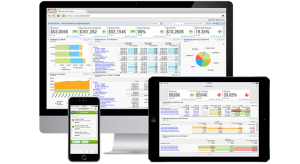
Sage Intacct is a general ledger and financial management platform. Unlike many of its competitors, it was designed as a SaaS application from the beginning. It's a somewhat scalable program that allows businesses to add modules as they grow and their needs change. The basic version of Intacct comes with the following modules:
- General ledger
- Accounts payable
- Purchasing
- Order management
- Accounts receivable
- Cash management
- Reporting and dashboards
- Digital Board Book (a metric-tracking dashboard for SaaS companies)
- Collaboration (a communication program that stores messages in one place and integrates with Salesforce)
Intacct subscribers can purchase and add the following modules as needed:
- Multi-entity management and global consolidations
- Project accounting
- Time and expense management
- Contract revenue management
- Contract and subscription billing
- Sales and use tax
- Check Delivery Service (automates check, ACH, and credit card payment runs)
- Inventory management
Intacct’s GL setup and presentation are fairly typical, except for one slight oddity: the chart of accounts only uses numbers for the top accounts. Prepaid expenses might be numbered 1400, for example, but the accounts under that one would have labels like “Buildings,” “Vehicles,” “Furniture,” and so on instead of numbers like 1410, 1420, etc.
Pros and cons
Pros: Intacct does a great job of automating basic accounting functions, which allows finance teams to devote their time to more complex processes. For instance, accounts payable tasks are managed in “workflows” that minimize the need for data entry.
The program uses a simple navigation system that is quite intuitive for most users. It can run on any device that has Internet Explorer, Chrome, Firefox, or Safari, so it’s possible to use Intacct on tablets or smartphones in addition to computers.
Cons: Intacct lacks both payroll and CRM modules, although it does integrate with Salesforce CRM.
Intacct support is only available Monday through Friday between 6 a.m. and 6 p.m. Pacific Time, though users can ask the Sage Intacct Community for help 24/7. Buying the program through a reseller will typically also come with the option to get support from that provider.
Pricing
Like nearly all SaaS platforms, Intacct runs on a subscription model. A basic version of the program may cost as little as $5,000 a year. However, larger companies with more complex accounting needs could end up spending $30,000 or more per year.
Who should choose it?
Intacct is a great choice for businesses that have outgrown QuickBooks and its competitors, but don’t need tons of extra functions. The program can also benefit companies using Salesforce as it integrates well with that CRM.
Oracle NetSuite
The basics
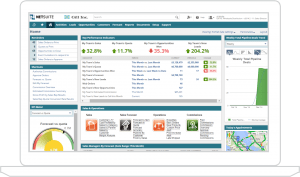
Oracle NetSuite, like Intacct, was intended from the start to be a cloud-based program. In fact, the company NetSuite was a pioneer in cloud software design prior to its acquisition by Oracle. NetSuite is not just an accounting program; it’s packed with other functionalities, including a full-scale CRM. NetSuite comes in a number of different versions that are set up for customers in specific industries, such as nonprofits, education, financial services, and health care. It also comes in different “editions:” Limited Edition (for companies with fewer than 10 users), Mid-Market Edition (more than 10 users or multiple legal entities), and Enterprise Edition (1,000 or more users).
All three NetSuite editions come with the following functions:
- Financial management
- Financial planning
- Order management
- Production management
- Supply-chain management
- Warehouse and fulfillment
- Procurement
- CRM
Together, these management features give NetSuite users an integrated view of operations across finance, supply chain, and fulfillment.
NetSuite subscribers can purchase and add the following financial modules as needed:
- OneWorld (supports various multinational functions, such as currency adjustments and foreign taxation compliance)
- Advanced inventory
- Advanced financials (provides enhanced billing automation)
- Advanced procurement
- Contract renewals
- Demand planning (for inventory demand projections; requires the advanced inventory module)
- Fixed assets
- Incentive compensation (for calculating complex sales commissions)
- Point of sale (POS)
- Project costing
- Project management
- Premier payroll
- Recurring billing (for SaaS and other subscription-based companies)
- Revenue recognition
- Resource allocation
In addition, NetSuite subscribers can add modules to support more specialized functions, such as SuiteCommerce (for ecommerce companies) and Manufacturing WIP.
Pros and cons
Pros: NetSuite’s enormous list of functions, modules, apps, and integrations makes it remarkably customizable. Furthermore, you can create custom workflows to manage various processes. Because the program comes in several different editions, it’s easy for companies to upgrade their subscription as needed. That almost guarantees that an organization will not have to go through the process of switching to a new accounting system due to growth. NetSuite subscribers have flexible support options. They can either stick with the basic support package or purchase premium support, which includes 24/7 phone support, telephone case submission, and early notification for new releases.
Cons: NetSuite has a search function, but it’s not particularly well designed. This can be challenging given the program's complexity. New NetSuite subscribers must expect to spend a considerable amount of time and money getting the program set up and training finance personnel to use it. Without adequate training, users can easily get lost while trying to navigate through the vast array of screens and functions.
Pricing
Price will vary quite a bit depending on which edition and modules are needed. The base subscription is $999 per month plus $99 per user per month, so the minimum subscription may be almost $12,000. Resellers will likely charge additional fees for setup, support, and other services.
Who should choose it?
Enterprise-level companies that want their accounting platform to do more than just accounting would do well with NetSuite. Businesses that expect to grow quickly might also want to choose NetSuite, since it can scale up easily.
Beyond the budget: NetSuite vs. Intacct for your company
Pricing aside, we can break down which ERP is right for you through a few different considerations.
Key Differentiators
Sage Intacct and NetSuite offer a plethora of professional services and features to streamline your accounting process. For some users, especially small to mid-sized businesses, they can seem almost identical outside of the software look-and-feel, especially at first glance.
But there are a couple of key differences between the two:
- NetSuite offers a larger library of functions and modules, but also requires extensive training. (Check out our NetSuite hacks to lower the learning curve.)
- Sage Intacct is a specialized accounting software; Oracle NetSuite is a cloud software with accounting features.
- Having been around longer, Oracle NetSuite has more integrations than Sage Intacct, but this can be both a blessing and a curse.
Customer Satisfaction and User Experience
Since Sage Intacct was built as an accounting software first, the user experience is far more favorable to finance professionals. Oracle NetSuite is a powerful program, but being a catch-all cloud software with dozens of modules and hundreds of integrations, it can be challenging to use for beginners.
This is one of the few reasons that many firms, especially in the small to mid-sized range, prefer Sage Intacct over NetSuite. It can be easier to “get up and running” faster, and being an accounting-first software, it requires less company-wide training.
How to choose the right ERP
For most organizations, choosing the right ERP will come down to the bottom-line. But it’s important not to overlook factors that will lower the long-term costs of scalability. Ease of use, minimal required training, and the number of integrations all make it more affordable to grow your business without outgrowing your ERP.
Some best practices to ensure you’re selecting the right ERP solution include:
- Asking your finance team for feedback
- Ensuring your ERP integrates with other ideal solutions
- Consider migration and training expenses
- Bring in company stakeholders to determine whether you need more than accounting modules
- Map out the entire process of migrating, setting up your ERP, and finance workflow before investing in your new software
Turbocharge Your ERP
Once you’ve chosen your ERP and got it running, it’s time to look at optimization. Ideally, you’ll have considered potential integrations while selecting your ERP—but it’s never too late to make your financial process better (and ideally automated).
As a leader in AP automation solutions, Teampay integrates popular accounting software and ERPs to streamline processes, capture key financial data, automate financial reporting, and drive revenue. Discover how you can take your workflow to the next level with our Sage Intacct and NetSuite integrations.